


Our test result : 4.5/5
Our experience with Draftbit has been extremely positive; the tool has allowed us to create mobile applications quickly and efficiently, without requiring extensive programming skills. We particularly appreciate its flexibility and its ability to integrate APIs, making it an ideal choice for both developers and non-developers.
Creating a mobile application may seem like a daunting task, especially if you don’t have programming skills.
The complexity of development, the associated costs, and the time required to transform an idea into a functional application can deter many entrepreneurs and creators.
However, technology has evolved to make this process much more accessible thanks to no-code or low-code development tools . These tools allow almost anyone to turn an idea into reality, without requiring extensive technical skills.
Today, in this review , we will explore what Draftbit is , its main features, and also its pricing.
Don’t have time to read everything? Here’s what you need to know about Draftbit:
Visual design interface : Draftbit’s drag-and-drop interface makes it easy to design your app’s user interface with a library of pre-built components (buttons, images, text fields, forms, etc.).
API connectivity : Integrate real-time data by connecting to external REST APIs. Display information from databases, interact with third-party services, and synchronize data without writing complex code.
Real -time preview : Preview your app directly on your device or in your browser as you build it. See the effects of your changes instantly and test user interactions in real time. Easy publishing
: Publish your app to different platforms in just a few clicks. Deploy a PWA for the web or test your mobile app via Apple TestFlight or Google Play Beta before submitting it for official release. Advanced customization : Draftbit allows developers to add custom code for those who want to take things further. Injects JavaScript content, adds custom functions, and uses npm packages for extended functionality.
Introducing Draftit
Draftbit is a platform that allows you to design native mobile software for iOS and Android without having to program.
Founded by a team of technology enthusiasts, the company aims to make software creation accessible to everyone , regardless of their level of development skills.
The tool itself has an intuitive drag-and-drop interface, where you can design, build, test and publish your project, while having access to the source code.
Draftbit stands out for its flexibility, allowing you to customize every detail of your software and connect to various external services and APIs to enhance its capabilities.
Who is Draftit for?
Draftbit caters to a variety of profiles, each finding their use in this tool according to their needs and skills:
- Entrepreneurs wanting to quickly launch a mobile product
- Startups looking to optimize their workflow with an in-house solution
- Developers looking to accelerate the software creation process
- Designers wishing to transform their prototypes into functional products
- SMEs and large companies looking to develop internal tools without mobilizing development teams
Draftit’s main features
Draftbit offers a multitude of features to allow you to create complete and high-performance applications.
Visual design interface
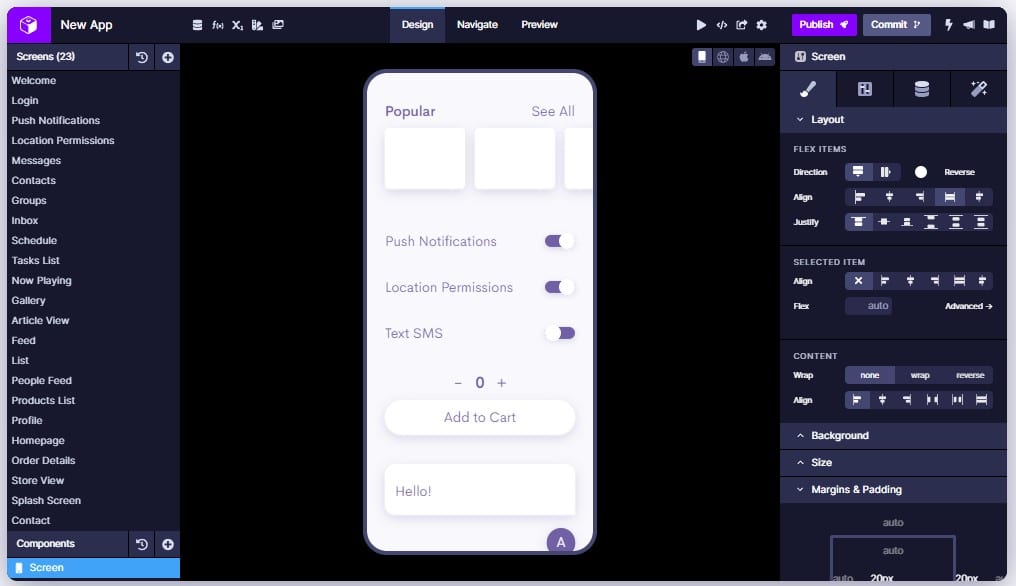
Draftbit’s drag-and-drop tool is one of its most powerful features. It allows you to design your software’s user interface intuitively and easily.
You can choose from a vast library of pre-built components , such as buttons, images, text fields, forms, and much more.
These elements can be easily customized in terms of style, color , and layout to perfectly match your project’s aesthetic. Using this visual presentation, you can see in real time what your software will look like, facilitating quick adjustments and continuous iteration.
API Connection
With Draftbit, you can integrate real-time data into your software by connecting to external REST APIs .
Whether you want to display information from an external database, interact with third-party services, or synchronize data between different systems, connecting to APIs is simplified.
All you need to do is enter the API URL and map the data to your project’s components. This integration allows you to create robust, connected solutions without writing complex code .
Real-time overview
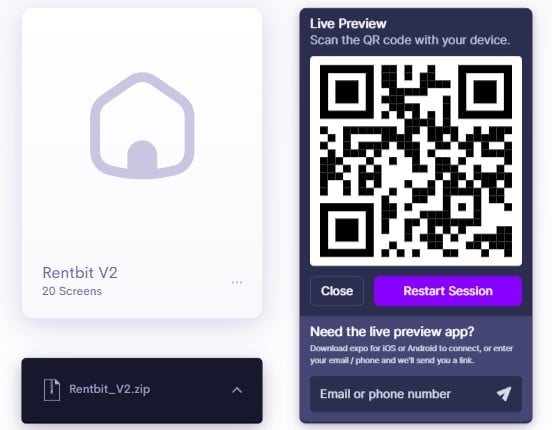
Real-time preview is a crucial feature that allows you to preview your project directly on your device or in the browser as you build it.
This presentation gives you a precise view of how your software looks and works on different devices, which is essential to ensure an optimal user experience .
You can immediately see the effects of your changes, test user interactions and make adjustments in real time, making the development process much more efficient and less prone to errors.
Easy publishing
Whether you want to deploy web software or publish it on App Stores , Draftbit lets you do it in a few clicks.
For web applications, you can deploy a Progressive Web App (PWA) in minutes. For mobile applications, you can test your product via Apple TestFlight or Google Play Beta before submitting it for official release.
This publishing flexibility allows you to quickly share your software with real users and gather feedback for future iterations.
Advanced customization
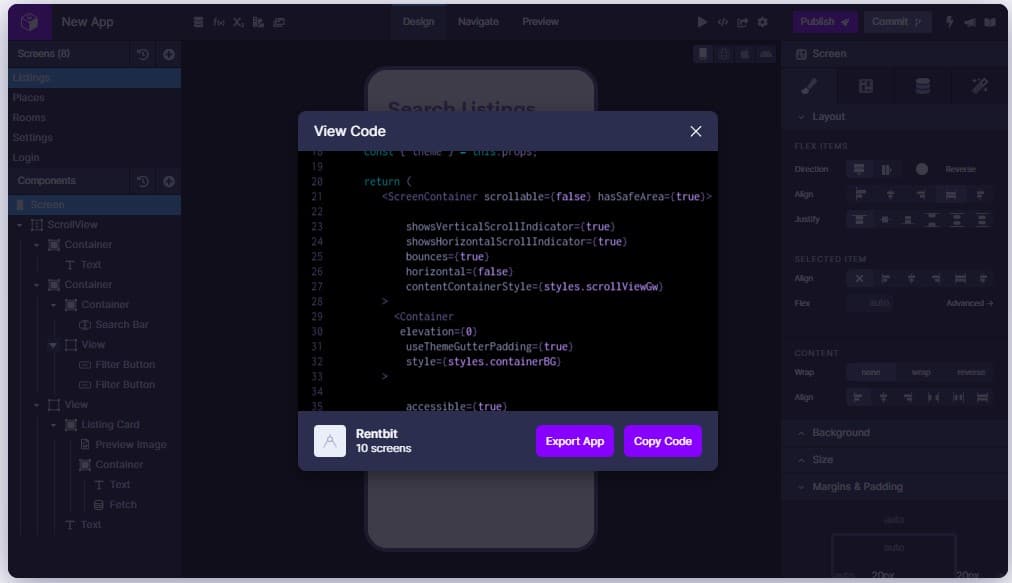
Although Draftbit is designed to be used without code , it also offers customization options for developers who want to go further.
You can inject JavaScript content, add custom functions, and use npm packages to extend the functionality of your application.
This advanced customization allows you to control every detail of your application, from business logic to visual appearance, including user interactions.
You can also create custom themes to ensure visual consistency across all parts of your application.
Draftit pricing
Draftbit offers several pricing options to meet the diverse needs of its users, from beginners to professional teams.
Free Plan
The free plan is perfect for getting started with Draftbit . It includes all visual features, up to 5 screens per application, 3 drafts, and 2 API endpoints.
It’s ideal for small projects or for exploring the platform at no cost.
Basic Plan
The Basic plan, at $19/month (billed annually) , is designed for those who wish to publish their creations.
It gives you the ability to manage a live application with up to 25 screens, an unlimited number of drafts, unlimited API endpoints, and to publish to iOS, Android and the Web.
Pro Plan
The Pro plan, at $59/month (billed annually) , is aimed at advanced users and developers. It provides access to the source code, allows the addition of custom content, and the import of npm packages.
This plan also offers testing on iOS and Android simulators , publishing on multiple platforms, and advanced options.
Team Plan
The Team plan, at $199/month (billed annually) , is ideal for teams working on multiple projects simultaneously. It allows you to manage up to 15 live applications, with unlimited screens and collaboration, and includes GitHub integration.
This plan also offers simulator testing and publishing options on various platforms, thus facilitating the management of complex tasks and collaboration between team members.
The advantages and disadvantages of Draftit
Draftbit is a powerful tool for creating applications, but like any tool, it has its strengths and weaknesses. Here’s an overview of the tool’s main advantages and disadvantages.
The advantages
✅ Intuitive and easy-to-use interface
✅ Access to the source code for complete customization
✅ Real-time preview on device or browser
✅ Easy integration with external APIs and services
The disadvantages
❌ Customization may be limited in some cases
In summary: our opinion on Draftit
Our experience with Draftbit has been very positive . This tool allowed us to quickly transform ideas into functional applications, without requiring extensive programming skills.
The tool stands out for its flexibility and ability to customize every aspect of the application , making it an ideal choice for entrepreneurs, developers, and project teams.
Draftbit makes it easy to design, build, and publish applications with an intuitive interface and powerful features.
The ability to preview in real time and connect external APIs makes the user experience even smoother and more interactive.
However, the only constraint encountered was the need for time to master the most advanced features.
To take full advantage of everything Draftbit offers, a little practice and learning are required. But once mastered, it becomes an invaluable tool in your development arsenal.

